←Back to portfolioCase Study · David Silverlight
Case studyKudurru Stone
DisciplineReact web app
IndustryLand surveying
Companion to.NET MAUI field app

Kudurru
Stone.Web Client

The office side of Kudurru Stone. A survey firm runs its whole operation here: projects, clients, crews and the weekly schedule. Its branded client portal is the front door, where every request arrives with a reference number and becomes a job without anyone retyping it.

Two working demos below: submit a request in the client portal, then build a form of your own in the form builder.

Fig. 01: DashboardOffice view · today's work at a glance
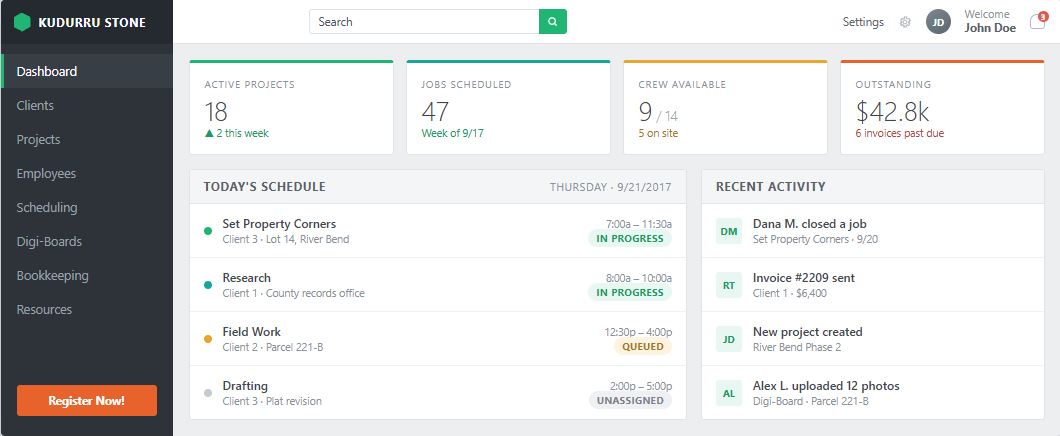
Kudurru Stone Web Client dashboard showing active projects, jobs scheduled, crew available, outstanding invoices, today's schedule and recent activity
01The problem

Without a front door, intake is chaos.

Survey requests used to arrive by phone, by email and by voicemail. Details got lost, nobody was sure what had been promised, and clients called back to ask whether anyone had received their request. Once the job started, those gaps showed up in billing and scheduling.

  • Voicemail

    "…need corners staked before grading, two parcels, call me back…"No address. No callback number.

  • Email

    "Following up on my request from last week. Did you get it?"Which request?

  • Phone

    A quote promised "by Friday," written on a sticky note.Sticky note missing.

  • Web form

    A survey request typed into the site's generic contact form.Free text, not a record.

A kudurru was a Babylonian boundary stone: a carved record of who held a parcel and where its lines ran.

The name fits. Kudurru Stone is the system of record for a survey firm, and the web client is where that record is kept: every request, project, crew assignment and schedule change in one place. Crews carry the .NET MAUI field app on site.

02Client portal · try it

A branded request form, with a reference they can track.

Each firm gets its own portal on a branded subdomain. A client fills in the form, gets a tracking reference on the spot, and doesn't need a login to check on it. Submit the example, then play the firm's part and turn the request into a project.

● Secureridgeline.kudurru.app/request/boundary
R
Ridgeline Survey Co.Welcome! Tell us about your property and we'll take it from here.

Request a survey.

POWERED BY KUDURRU STONE
KS-?????Submit the form. The confirmation and tracking reference appear here.
Request received · tracking reference
KS-20418

A copy and the tracking link went to ops@ridgeline.dev. You can check on it any time with this reference. No login needed.

  1. ReceivedA structured record
  2. EmailedClient gets the tracking link
  3. NotifiedTeam sees every field
  4. ProjectNothing retyped
Firm side · Kudurru Stone Web Client
#PR-2218from KS-20418
Type
Boundary survey
Site
1420 Ridgeline Rd, Meridian ID
Contact
ops@ridgeline.dev
Scope
Corners staked before grading starts.
✓ Every highlighted field came straight from the client's request · ✓ QuickBooks sync queued

Illustrative demo. Ridgeline Survey Co. and every value shown are example data.

03Form builder

Not a generic contact form. Their form, as many as they need.

A firm names a form, adds fields, marks each one required or optional, previews it and publishes. A quote request, a boundary survey and an ALTA can each have their own form and shareable link, showing the firm's logo, colors and welcome message.

Forms

Fields · 4

    Add a field

    Portal brand color

    Interactive: switch forms, add field types and toggle required. The brand color also restyles the portal in section 02.

    04The flow

    From a request to a job, with nothing retyped.

    Four steps, and the details the client typed in carry all the way through to the project.

    A

    Build your own request form

    Name it, then add text, email, phone, dropdown, checkbox or description fields, each required or optional. Preview it, then publish. A firm can run as many forms as it likes.

    B

    Share one link

    Each form has its own URL on the branded portal, with the firm's logo, colors and welcome message. It can go on the firm's website or into an email to a client.

    C

    Every submission gets a reference

    The client sees a confirmation with a tracking reference and gets a confirmation email. The team gets an internal notification with every field the client filled in.

    D

    Turn a request into a job

    The request becomes a project with its own project number, and can sync to QuickBooks if the firm wants it to. Nobody retypes what the client already entered.

    05Inside the firm

    Once it's a job, the whole office runs on it.

    The rest of the web client is where the firm works the job: who it's for, who's on it, when it happens and where it stands. Choose a screen, then select a numbered marker to read its note. Click a screenshot to enlarge it.

      06Visual language

      One meaning per color, on every screen.

      Green is underway or available, amber is waiting or partial, and gray is not started or unavailable. Task types keep their colors from the scheduler through to the project page, so the office reads status before it reads words.

      Status chips

      In progressActiveAvailableOn site QueuedOn holdPartialTravelling UnassignedArchivedUnavailableOffice

      Task types

      TYPESet Property Corners
      TYPEResearch
      TYPEField Work
      TYPEDrafting

      Dashboard tiles

      Active projects18
      Jobs scheduled47
      Crew available9 / 14
      Outstanding$42.8k
      07Why it matters

      A request becomes a record, not another email.

      The portal runs on the same system as the firm's projects. A request arrives as a structured record with a reference number, so it becomes a project in one step, and clients can come back later and sign in to follow their projects.

      Generic contact form

      • Free text in an inbox
      • No reference number, so clients call to check on it
      • Someone retypes the details into the job system
      • Files go back and forth as email attachments
      • Same form for every kind of survey

      Kudurru Stone client portal

      • A structured record with every field in place
      • Tracking reference on screen and by email, with no login needed
      • Converts to a project in one step, with optional QuickBooks sync
      • Clients sign in with a passwordless magic link and swap files in dedicated folders
      • A separate branded form for each kind of request
      08Role & stack

      The office side of one system of record.

      Scope

      Dashboard, clients, projects, crew availability, the weekly scheduler and the branded client portal, all on the same platform as the .NET MAUI field app.

      Discipline

      React web app · UX/UI design · front-end engineering

      Stack
      ReactTypeScriptREST APIQuickBooks syncMagic-link authResponsive CSS